EXIFLOG
A Software Tool for Logging Digital Photos
EXIFLOG is a simple freeware program I wrote in C# to help me keep logbooks of my digital
photographs. The current version is tested in Windows 10 and 11.
Older versions also run under Windows 2000 and XP, as well as
Linux and macOS using mono.
The source code is a Visual Studio project.
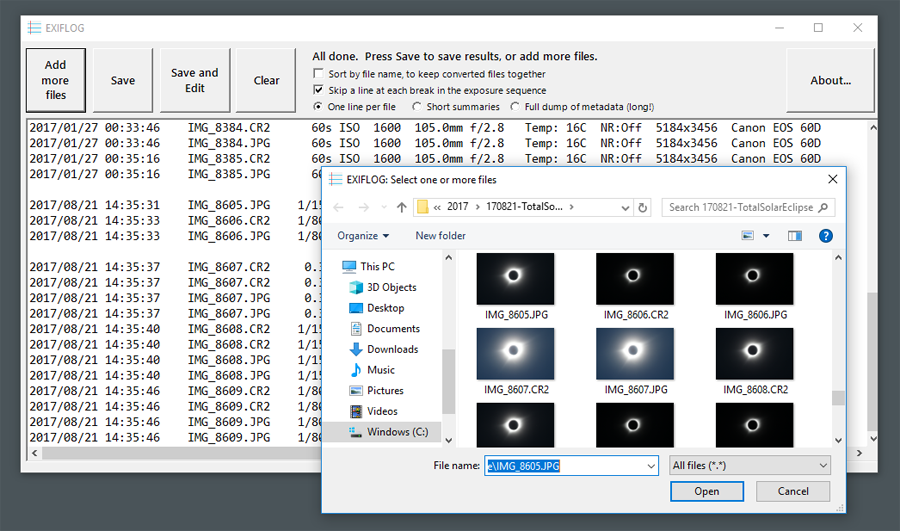
EXIFLOG reads a group of files and creates a text file summarizing the EXIF exposure data in them,
sorted by camera (original image) date and time.
To create a logbook page, I click "Save and Edit"
add other information about each picture as appropriate.
Click here to get the latest version for Windows (July 2024),
which includes a complete installation of ExifTool.
It supports newer cameras and produces better output from FITS and XISF files.
EXIFLOG 3 and 4 are wrappers around
Phil Harvey's ExifTool to read metadata in a huge variety
of picture and video files.
Earlier versions used my own algorithms to retrieve basic EXIF data.
EXIFLOG 2.6 and up also support XISF, FITS, and SER files (which do not use EXIF but rather have
headers in their own formats).
Versions for Windows:
EXIFLOG 4.0 (2024) is for Windows 10 and 11 and installs in a completely new way, by simply
copying a folder into any convenient place and then pinning EXIFLOG.exe to Start.
Instructions are included. No Windows installer is used.
This version produces considerably more informative one-line output from FITS and XISF files.
Because it uses a newer version of ExifTool, it also supports many more digital cameras.
EXIFLOG 3.7 is for Windows 7 and up (with updates; it requires .NET 4.5, which comes in with updates),
32- and 64-bit.
It is full-featured and supports many cameras using ExifTool.
Note that ExifTool is updated
more often than EXIFLOG.
At any time, you can download the latest Windows executable of ExifTool, which unpacks as a file
named exiftool(-k).exe, rename it to exiftool.exe, and place it in the
installation directory in place of the one that came with EXIFLOG.
EXIFLOG 2.6/2.7 is a separate, continuing line of development for people who want a smaller, faster,
but less full-featured program, and who want to be able to run it under macOS and Linux.
Version 2.7 has been modernized to look much more like 3.7.
EXIFLOG 1.5, no longer under development, is compatible with Windows XP.
For Linux and macOS:
I am successfully running EXIFLOG 2.6 and 2.7 under Linux using Mono.
They should work the same way under macOS.
In Ubuntu and Linux Mint, simply unpack EXIFLOG.exe (version 2.6 or 2.7), put it on your desktop,
right-click, and choose "Open with Mono runtime."
Or launch it with the command mono ./EXIFLOG.exe giving the appropriate path
to where EXIFLOG.exe is located.
If that doesn't work, make sure you have the current version of Mono
by setting repositories as described
at this link and installing the package mono-complete. If that still isn't sufficient,
also install the packages gtk2-engines-murrine, and gtk2-engines-pixbuf.
If you haven't set repositories, it is easy to get stuck with an old version of Mono.
Then EXIFLOG will run but may have scattered malfunctions.
The current version is 6.4. Use the command mono --version to check.
Downloads:
Note:
Some browsers and antivirus programs balk at letting you run the EXIFLOG installer
right after downloading it, just because they have not seen it before.
It has been virus-checked, and you are
welcome to virus-check it yourself before running it.
Note: In the past, some antivirus software has false-triggered on EXIFLOG,
apparently finding patterns of bytes in it that happen to occur in viruses.
My software is built in a secure environment and no real virus has ever been found in it.
If you have problems along these lines, please contact me.
Current version (4.0) downloads (Windows only):
EXIFLOG 4.0 to install by copying in place (zipped) (July 2024)
EXIFLOG 4.0 including source code (zipped) (July 2024)
Previous version (3.7) downloads (Windows only):
EXIFLOG 3.7 installer (zipped) (minor revision, January 2020)
EXIFLOG 3.7 source code (without the January 2020 revisions)
Note: Using EXIFLOG 3.0 to 3.4 is not recommended.
Please upgrade at least to 3.7.
Version 2.7 downloads (for Windows, macOS, and Linux):
EXIFLOG 2.7 installer (Windows) (zipped; may give warning in some browsers)
EXIFLOG 2.7 executable (zipped) mainly for Linux and macOS Mono users
EXIFLOG 2.7 source code
Version 2.6 downloads (for Windows, macOS, and Linux):
EXIFLOG 2.6 installer (Windows) (code signed; may give warning in some browsers)
EXIFLOG 2.6 executable (code signed, zipped) mainly for Linux and macOS Mono users
EXIFLOG 2.6 source code
Older version for Windows XP:
EXIFLOG 1.5 executable
EXIFLOG 1.5 source code
Copyright 2005-2024 Michael A. Covington. Caching in search engines is explicitly permitted.
Please link to this page rather than reproducing copies of it.
This page is not in any way connected with or endorsed by any
manufacturer. Many of the product names that appear
on this page are registered trademarks of their respective owners.
| 




 Top
Top