 |
 |
Covington Innovations Home > Astronomy and Astrophotography > Links > Digital SLR Notes > Monitor Calibration


Monitor Calibration
Michael A. Covington
Revised December 31, 2006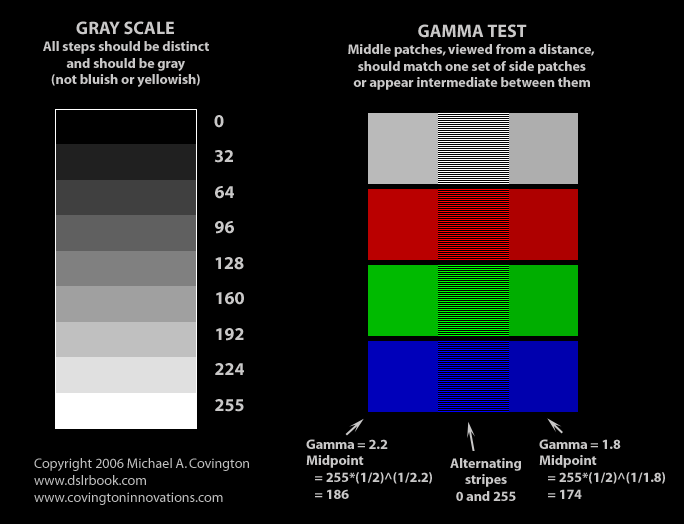
This page will help you adjust your monitor for correct brightness, contrast, and color.
To adjust color, you will need to use the settings menus for your video card. In Windows, these are probably in Control Panel, and they may also be available by right-clicking on the desktop and choosing Properties, Settings, Advanced.
The adjustments to think about are:
- Brightness and contrast: Can you see all the gray scale steps and are they evenly spaced?
- Overall color balance (color temperature): Do the gray steps all look gray, not bluish or yellowish as a whole? (If some are bluer or yellower than others, you need to adjust color gamma, below.)
- Overall gamma: Is the gray gamma test correct? This tells you whether the midtones are too light or too dark as a whole.
- Color gamma (red, green, and blue): Is the gamma test incorrect for one or more of the three primary colors? This tells you whether you have color crossover, i.e., midtones lighter in one color than in another.
The first three of these are normally adjusted on the monitor itself; the latter two, on the video card.
Make sure you are viewing the test image at full size. In Internet Explorer, you may need to click on it if it has been shrunk to fit your display.
Copyright 2006 Michael A. Covington. Caching in search engines is explicitly permitted. Please link to this page rather than reproducing copies of it. This page is not in any way connected with or endorsed by any photographic or software manufacturer. Many of the product names that appear on this page are registered trademarks of their respective owners.
